


Secure Files & Digital Rights Management
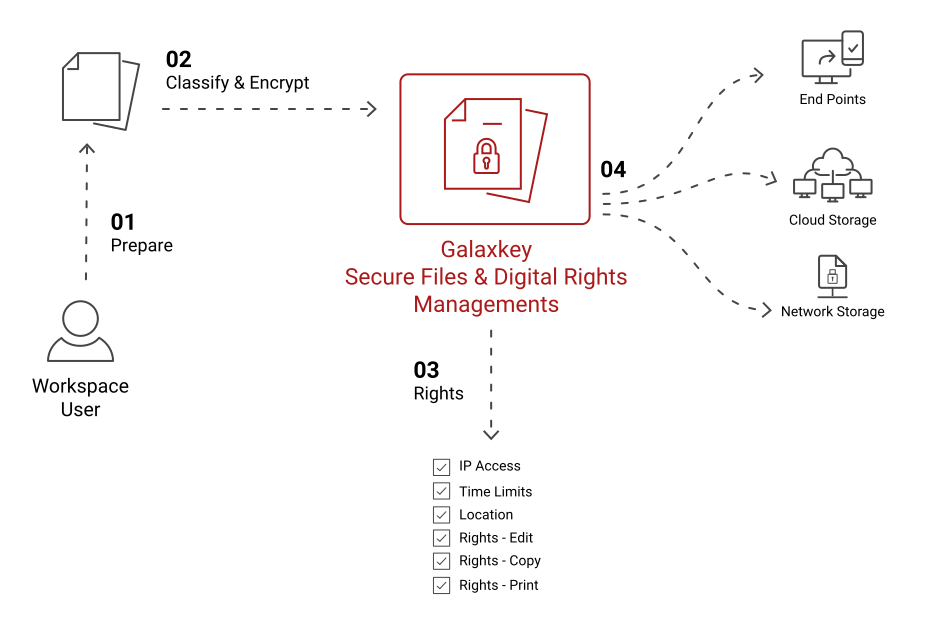
File encryption & Digital Rights Management to control Who, When, How and from Where they can access the secured file.

Secure Files & Rights Management
Galaxkey Secure Files & Digital Rights Management is a content-level data protection solution designed to secure unstructured business data such as Microsoft Office documents, PDFs, and image files. Built on the Galaxkey Platform, it applies persistent encryption and digital rights controls directly to files, ensuring data remains protected wherever it is stored, shared, or accessed. Using a federated encryption model, organisations retain full ownership of encryption keys within their own environment, enabling true data sovereignty and total control over file visibility and usage.
-
Secures unstructured files with persistent, file-level encryption
-
Enables granular digital rights management independent of cloud or application providers
-
Allows secure sharing and collaboration without losing control of data
-
Ensures full data sovereignty through customer-controlled encryption keys
-
Built on the Galaxkey Platform with centralised key management and auditing
Key Features
Galaxkey Secure Files & Digital Rights Management ensures complete control, encryption, and compliance for secure file storage, sharing, and collaboration.
Each file is encrypted individually using Galaxkey’s three-layer encryption architecture. Encryption persists regardless of where the file is stored or shared, including cloud storage, removable media, or third-party platforms.
Control exactly how files can be accessed and used, including rights to view, edit, copy, print, share, or revoke access. All rights are enforced at the file level and can be modified at any time.

Grant or remove user access dynamically, even after files have been distributed. If a file is lost, stolen, or shared incorrectly, access can be revoked centrally.

Apply expiry dates, offline access limits, country restrictions, or network-based access controls to ensure files are only accessible under approved conditions.

Apply standardised security policies using file classifications such as Public, Internal, Sensitive, or Confidential. Rights, encryption, and access controls are automatically enforced based on classification.

Encryption keys are stored centrally and never embedded in files. Administrators and file owners can view detailed audit logs showing file access, edits, locations, networks, and usage history.

Files open in their native applications such as Microsoft Word, Excel, or Adobe Reader. Editing and saving automatically re-secures the file, requiring no change to user workflows.
Enterprise Benefits
Galaxkey can be deployed in either Cloud, Hybrid of On-Premises mode, according to the business’s requirements, to ensure full compliance with regulations and data protection.
Protect sensitive business information that lives outside databases and applications, which is often the largest and least controlled data risk area in organisations.

Unlike traditional cloud encryption, Galaxkey ensures organisations control their own encryption keys, not cloud service providers, reducing third-party risk and exposure.

Persistent encryption and rights enforcement ensure files remain protected even after sharing, forwarding, or storage outside the organisation.

Support regulatory and audit requirements through enforced access controls, classification policies, detailed audit trails, and revocation capabilities.

Enable internal and external collaboration without sacrificing security, while maintaining full visibility and control over file usage.
Classification-based DRM and centralised management allow organisations to protect millions of files consistently without manual intervention.

Users can work securely with encrypted files even without an internet connection.

Maintain detailed logs of all file interactions for security and compliance tracking.
Share and manage large files without restrictions, ensuring smooth business operations.

Choose on-premises, hybrid, or cloud-based deployment to maintain full control over your data.

Reduces risks of data breaches and compliance violations, saving on potential legal and financial repercussions.
Share files with third parties securely, without compromising data protection.

Designed for seamless adoption with minimal training required for employees.